這問題比較常在小module身上。
在Fortiview有看到LOG,可是在Forward traffic沒看到幾個。
到CLI下,
config log memory filter
set severity information
(原本是warning)
end
這樣就可以在Forward Traffic底下看到了。
不過可能是因為小module的Fortigate都是把log放在memory,不想浪費太多資源,所以才把紀錄設定的等級調得比較高。

2017年6月22日 星期四

2017年6月21日 星期三
Fortigate link-monitor 5.4
Fortigate 5.2的時候,GUI有個link-monitor的功能,可以偵測線路狀況。
5.4的時候,GUI就找不到了,原廠似乎建議使用WAN link load balancing功能去做。
不過link-monitor在CLI還是存在著,指令如下:
config system link-monitor
edit "port2"
set srcintf "port2"
set server "1.1.1.2"
set protocol ping
set gateway-ip 1.1.1.2
set source-ip 0.0.0.0
set interval 5
set timeout 1
set failtime 5
set recoverytime 5
set ha-priority 1
set update-cascade-interface disable
set update-static-route enable
set status enable
next
edit "port3"
set srcintf "port3"
set server "2.2.2.2"
set protocol ping
set gateway-ip 2.2.2.2
set source-ip 0.0.0.0
set interval 5
set timeout 1
set failtime 5
set recoverytime 5
set ha-priority 1
set update-cascade-interface disable
set update-static-route enable
set status enable
next
end
5.4的時候,GUI就找不到了,原廠似乎建議使用WAN link load balancing功能去做。
不過link-monitor在CLI還是存在著,指令如下:
config system link-monitor
edit "port2"
set srcintf "port2"
set server "1.1.1.2"
set protocol ping
set gateway-ip 1.1.1.2
set source-ip 0.0.0.0
set interval 5
set timeout 1
set failtime 5
set recoverytime 5
set ha-priority 1
set update-cascade-interface disable
set update-static-route enable
set status enable
next
edit "port3"
set srcintf "port3"
set server "2.2.2.2"
set protocol ping
set gateway-ip 2.2.2.2
set source-ip 0.0.0.0
set interval 5
set timeout 1
set failtime 5
set recoverytime 5
set ha-priority 1
set update-cascade-interface disable
set update-static-route enable
set status enable
next
end
2017年5月18日 星期四
Cisco Switch Block 445 Port
1.透過Vlan
ACL
ip access-list extended deny445
permit tcp any any eq 445
permit udp any any eq 445
VLAN Map
vlan access-map deny445 10
match ip address deny445
action drop
vlan access-map deny445 20
action forward
Applying VLAN Map to VLAN
vlan filter deny445 vlan-list “Vlan
ID”
2.透過port
ip access-list extended deny445
deny tcp any any eq 445
deny udp any any eq 445
permit ip any any
int r f0/1 – X or Gi1/0/1 - X
ip access-group deny445 in
Fortigate Poicy Route
紀錄一下
1.沒有longest mask matching,Policy Route權限最大。
所以如果有一筆Policy Route 是 DMZ > WAN,0.0.0.0/0。這樣會全部流量都走WAN出去,就算static route有路由往Lan,還是不會走。
解決方式為新增一筆Policy Route,source and destination 就輸入想要的,下面Action選擇Stop Policy Routing。並將此條往上拉,這樣就不會看Policy Route,而是看Static route了。
2.Routing Table沒有的,Policy Route 不會生效。
1.沒有longest mask matching,Policy Route權限最大。
所以如果有一筆Policy Route 是 DMZ > WAN,0.0.0.0/0。這樣會全部流量都走WAN出去,就算static route有路由往Lan,還是不會走。
解決方式為新增一筆Policy Route,source and destination 就輸入想要的,下面Action選擇Stop Policy Routing。並將此條往上拉,這樣就不會看Policy Route,而是看Static route了。
2.Routing Table沒有的,Policy Route 不會生效。
2017年5月4日 星期四
Fortigate Block Youtube
LAB了一個上午.....
當然有web filter最快。
如果要用Application control去阻擋。
除了Youtube相關要Block,QUIC的服務也要Block。
如果沒有擋QUIC,Chrome開youtube還是正常。
擋QUIC除了Youtube還會有啥影響,測試了一個上午還沒遇到。

當然有web filter最快。
如果要用Application control去阻擋。
除了Youtube相關要Block,QUIC的服務也要Block。
如果沒有擋QUIC,Chrome開youtube還是正常。
擋QUIC除了Youtube還會有啥影響,測試了一個上午還沒遇到。

2017年3月29日 星期三
Fortigate 60C WAN Load Balance LAB
紀錄一下
1.要做load balane的兩條WAN,要先把相關的policy與route先移除掉。
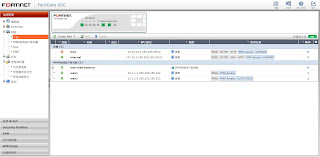
2.System > Network > WAN Link Load Balancing. Weighted Round Robin
然後輸入對點與偵測對點存活的設定。


3.設定路由,預設路由往Load Balance的介面丟。


1.要做load balane的兩條WAN,要先把相關的policy與route先移除掉。

2.System > Network > WAN Link Load Balancing. Weighted Round Robin
然後輸入對點與偵測對點存活的設定。


4.設定policy,原本outgoing interface是WAN1或WAN2,變更成Load Balance介面。

2017年1月17日 星期二
Fortigate 在 Transparent mode 時,兩邊設備用trunk port
參考fortinet KB文件
兩邊要通過的VLAN,在Fortigate上面也要起一樣的vlan interface。
只是一個vlan name只能在一個port上。
所以要新增兩個vlan 100的interface:vlan100inte、vlan100ext。
policy要用vlan interface去新增,或是直接in and out interface選擇any。
要允許或阻擋再用ip去做就好。
兩邊要通過的VLAN,在Fortigate上面也要起一樣的vlan interface。
只是一個vlan name只能在一個port上。
所以要新增兩個vlan 100的interface:vlan100inte、vlan100ext。
policy要用vlan interface去新增,或是直接in and out interface選擇any。
要允許或阻擋再用ip去做就好。
訂閱:
文章 (Atom)